What is ATS? How Applicant Tracking Systems Filter Your Resume in 2026
Your Resume Never Reached a Human
You spent hours crafting the perfect resume. You tailored it to the job. You hit "Apply." And then... silence.
Here's what actually happened: your resume was scanned by an Applicant Tracking System (ATS) — software that filters applications before any recruiter ever sees them. And yours didn't make the cut.
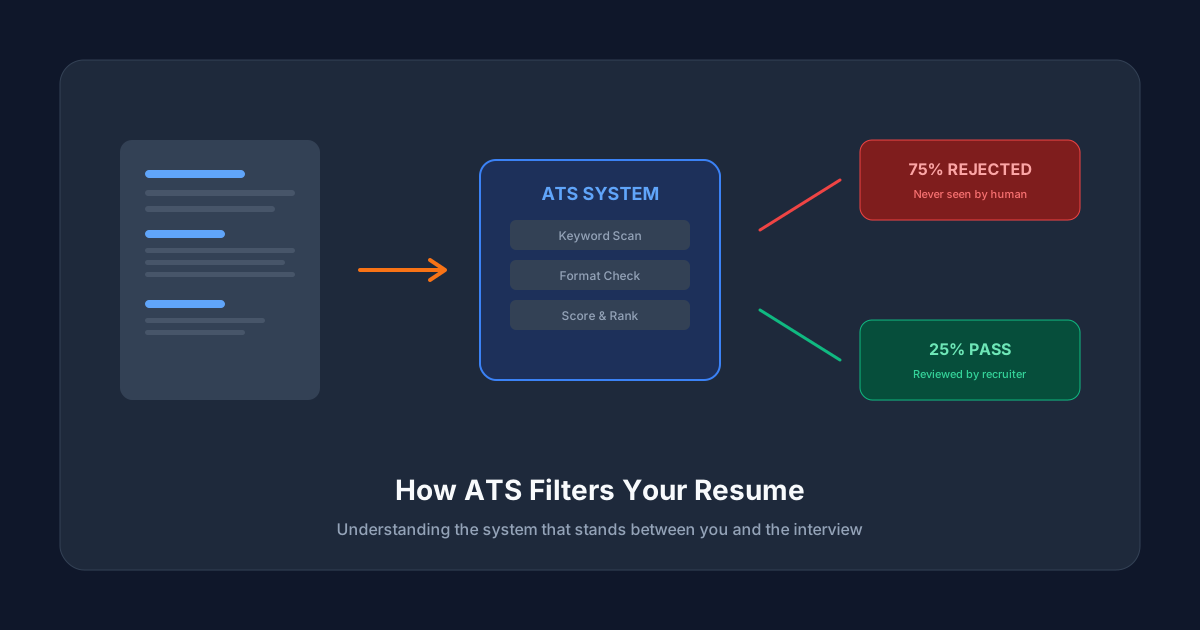
This isn't rare. According to recent hiring data, over 75% of resumes are rejected by ATS before a human reviews them. For large companies using systems like Workday, Taleo, or Greenhouse, that number can be even higher.
What Exactly is an ATS?
An Applicant Tracking System is software that companies use to manage their entire hiring pipeline. Think of it as a gatekeeper between you and the hiring manager.
When you submit your resume online, the ATS:
1. Parses your document — extracting your name, email, work history, education, and skills
2. Analyzes the content — comparing your resume against the job description
3. Scores your application — ranking you against other candidates
4. Filters out low-scoring resumes — only passing top matches to recruiters
The Most Common ATS Platforms
| ATS Platform | Used By | Market Share |
|---|---|---|
| Workday | Fortune 500, Enterprise | Large enterprises |
| Taleo (Oracle) | Government, Large corps | Legacy enterprise |
| Greenhouse | Tech startups, Mid-size | Growing fast |
| Lever | Tech companies | Mid-market |
| iCIMS | Healthcare, Retail | Enterprise |
| SAP SuccessFactors | Global corporations | Enterprise |
Each system parses resumes differently. Workday is strict about formatting. Greenhouse focuses more on scorecard-based human review. Taleo is notorious for stripping formatting entirely.
How ATS Scoring Actually Works
Modern ATS systems use a multi-layer approach:
Layer 1: Can It Read Your Resume?
The first test is simple: can the ATS extract your information? This fails when:
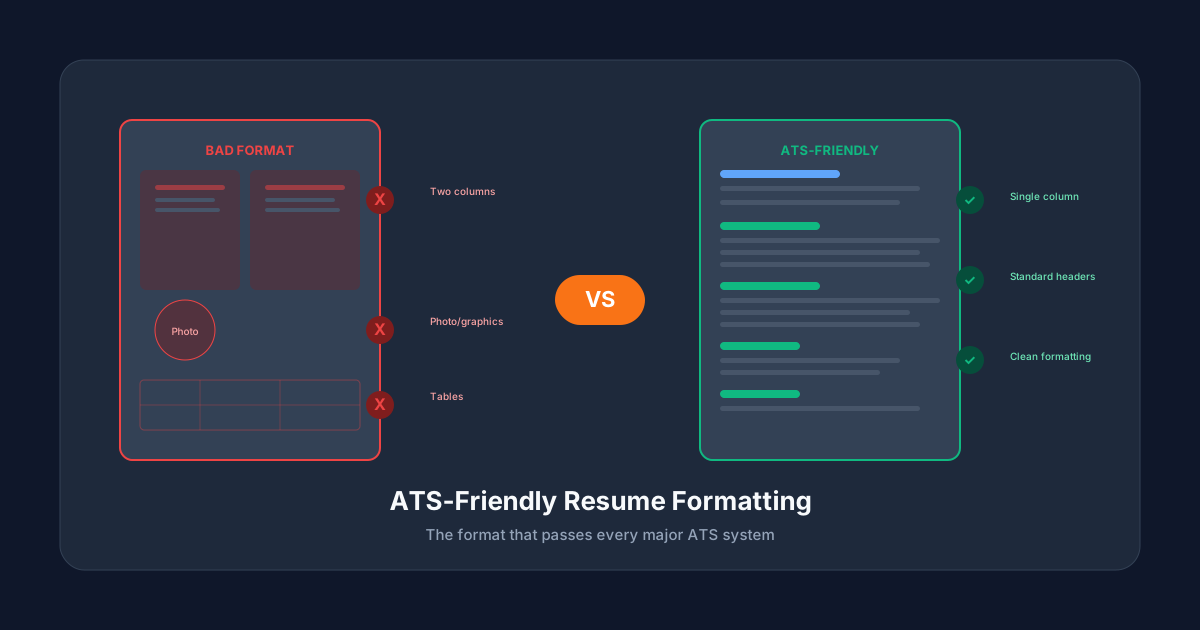
- You use fancy templates with columns, tables, or text boxes
- Your resume is an image-based PDF (scanned document)
- You put critical info in headers or footers (ATS often skips these)
- You use creative fonts or icons instead of standard text
Layer 2: Keyword Matching
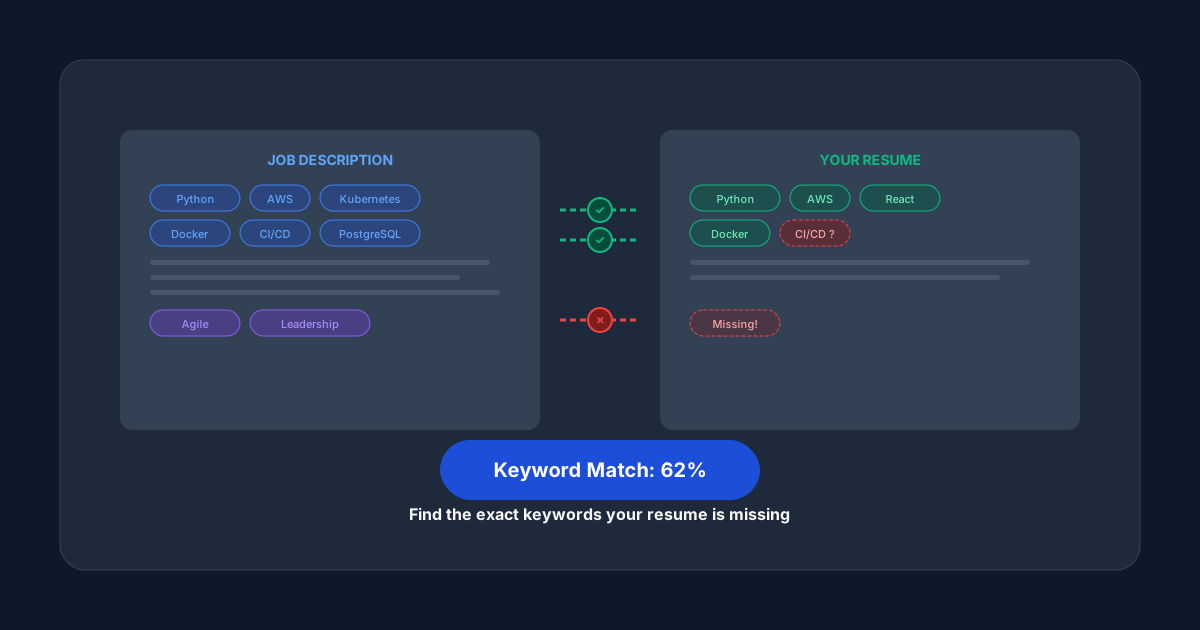
The ATS compares words in your resume against the job description. It looks for:
- Hard skills: specific technologies, tools, certifications
- Soft skills: leadership, communication, problem-solving
- Job titles: do your past roles align with the target position?
- Industry terms: domain-specific vocabulary
Layer 3: Contextual Relevance
Advanced systems like Greenhouse and Lever go beyond keywords:
- Is the keyword used in the right context? ("Managed" a team vs. "managed" a filing system)
- Does your experience level match? (5 years required vs. 2 years listed)
- Are your achievements quantified? (Numbers signal impact)
The 5 Most Common Reasons ATS Rejects Resumes
1. Wrong File Format
Some older ATS systems struggle with certain PDF types. While modern systems handle PDFs well, always check the job posting for format requirements.
2. Missing Keywords
If the job asks for "project management" and you wrote "led initiatives," the ATS might not make the connection. Use the exact terms from the job description.
3. Non-Standard Section Headers
ATS systems look for standard headers: "Work Experience," "Education," "Skills." Creative headers like "My Journey" or "Toolkit" confuse the parser.
4. Complex Formatting
Multi-column layouts, graphics, charts, photos — all of these can break ATS parsing. The system may read columns out of order or skip graphical content entirely.
5. No Dates or Inconsistent Dates
ATS systems expect consistent date formats (MM/YYYY or Month YYYY). Missing dates on work experience entries raise red flags.
How to Beat the ATS
Use a Clean, Single-Column Layout
Stick to a simple, professional format. One column. Standard fonts (Arial, Calibri, Georgia). No tables for layout.
Mirror the Job Description Keywords
Read the job posting carefully. Identify the key skills and requirements. Use those exact words in your resume where they honestly apply.
Include a Skills Section
Create a dedicated "Skills" section with bullet points. This gives the ATS a concentrated area of keywords to match.
Quantify Your Achievements
Don't just say what you did — show the impact with numbers:
- "Increased sales by 35%"
- "Managed a team of 12"
- "Reduced processing time by 60%"
Use Standard Section Headers
Stick with: Contact Information, Professional Summary, Work Experience, Education, Skills, Certifications.
The Fastest Way to Check Your ATS Score
Instead of guessing, you can check your resume's ATS compatibility instantly. ATSCrush analyzes your resume against any job description and gives you a detailed score — for free.
If your score is low, our AI rewrites your resume to pass ATS screening at 95%+ compatibility, delivered in under 2 minutes.